
Summary
Before delegating a task to an agent, decide what users should be able to do at the end. Inspect the result and identify what still fails so the next attempt has a clear focus.
- Use partial success to narrow the next investigation.
- Record the environment and user role for each test.
- Compare the effects of skills and steering on first results and time spent on rework.

A skill can capture steps and checks that apply each time. Use steering to deliver a new requirement during a run. This article proposes that skills reduce omissions in the first result and steering reduces rework when new requirements arise.
The records from OneDrive, the diagram library, and ReviewOps show which checks changed what happened next. To measure the effects of the two features, compare the same task across different conditions.
Restoring sync in a shared OneDrive folder
After restarting the app and macOS file sync service, a test file reached the server. The existing shared folder still had 18 pending items. Since new uploads worked, Codex looked for the folder associated with the existing backlog.
The shared folder on the server had been reorganized by year. The Mac was repeatedly trying to delete the old folders and files. Codex saved nine files that Finder did not show, then reconnected the shared folder shortcut. The pending count fell from 18 to zero, and both uploads and downloads passed testing.
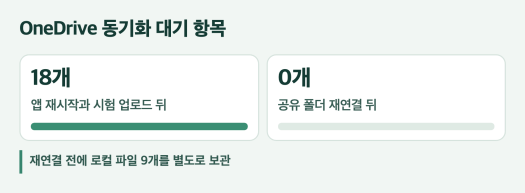
Check whether new files can be uploaded and downloaded, and locate the existing pending items separately. If the shared folder needs to be reconnected, first save any files that exist only on this device. After changing the connection, check the pending count again and retest uploads and downloads.
Testing user actions after deployment
Sign-in and permissions in the diagram library
We built the diagram library from source on the production server. We compared checksums for 3,439 files to verify that the copies matched the originals. An administrator signed in, opened a diagram, and downloaded the source presentation. A regular user later signed in and received an error page.
We changed permissions so anyone signed in to the portal could open and download the material. Upload and edit permissions went to administrators. Six sign-in and permission checks passed.
- The permission checks showed that regular users could open the material and were blocked from editing it.
- We signed in again to the production site as an administrator and returned to the list.
The administrator was the only role we used to sign in again directly on the production site. Include both the user role and the environment when reporting what a test covered.
Preserving settings after a ReviewOps update
We added an update requirement while deploying ReviewOps 1.7.0. Users who had opted into test builds needed to be able to update to a later stable release with the same base version. Codex created a build to test the transition and switched a profile running the test version to the stable version.
After restarting, the test-build preference and projects were still available. The earlier test build was no longer offered. Recovery between two physically separate PCs remained a follow-up check. ReviewOps 1.7.0 release notes
When to retry and when to end a run
When requesting an update, state that users must be able to move from the old version to the new one, restart, and open their settings and projects. For a library, specify what regular users and administrators can each do. Decide which files, accounts, and environments to use for testing so you can tell whether the work is complete.
- When the result works only in part. Record which actions succeed and which still fail. If new files upload but the queue stays the same, examine what OneDrive keeps trying to do in the existing shared folder.
- When the same failure recurs. Choose a test that will give different results for different possible causes. If you retry the same method, check what conditions have changed since the previous attempt.
- When requirements change during a run. Explain how the new requirement affects changes already made and work still underway. Send a condition that applies to the current result through Steer and put independent follow-up work in the queue.
- When the test environment is unavailable. Record what you tested and what still needs to be checked before ending the run. If the connection drops while saving, check whether the change was saved before sending it again.
List the actions that still fail and run the next test that can distinguish the possible causes. After the fix, retest the user action from the original request. List any remaining checks that require an environment you cannot access.
An experiment to compare skills and steering
In early 2025, METR randomly assigned 246 tasks among conditions for 16 experienced open-source developers. Tasks for which AI tools were permitted took 19% longer on average. METR’s developer study
In the 2026 follow-up, the participant group changed because some people who did not want to work without AI dropped out. It was also difficult to measure how long work took when several agents ran in parallel. Both studies compared allowing and disallowing AI use. Measuring the effects of Codex skills and steering requires separate conditions for each feature. Follow-up study and measurement limits
Experiment conditions and timing of the added instruction
| Starting procedure | Queue | Steer |
|---|---|---|
| Start without a skill | Start with the common request and send the added instruction to the next run | Start with the common request and send the added instruction to the current run |
| Start with a skill | Start with the common request and skill, and send the added instruction to the next run | Start with the common request and skill, and send the added instruction to the current run |
Have several participants try all four conditions. Randomize the order for each participant and assign work of similar difficulty so no condition receives a disproportionate share of any task. Keep the model version, settings, permissions, and tools fixed. For any given task, start with the same inputs and initial state in every condition.
Send the same added instruction at the same step. For example, when the first installable build is ready, add the requirement to preserve existing settings through the update.

First result, final result, and rework
- First run. Determine whether the first result meets the initial requirements shared by all conditions.
- Final result. Determine whether the tests pass with the added requirement. Measure elapsed time from the start of the task to passing the tests and separately measure the time the person spent directly on the work.
- Rework. Record repeated steps, the number of revisions, and model usage.
Keep the participant identities and experimental conditions hidden from evaluators. Report how many tasks exceeded the time limit alongside the completion rate. Track time spent creating and maintaining skills separately and compare it with time saved on recurring work.
Comparing paired results from the same person reduces the effect of differences in individual work speed. Also compare how much steering changes rework time with and without a skill. Results apply to the participants and tasks in the experiment. To find out whether the same differences hold elsewhere, repeat the experiment with other types of work.
Series overview · How the Way You Use Codex Affects the Outcome